Python Programming for Beginners

A Hands-On Crash Course with Step-by-Step Projects to Learn Python Fast and Build Real-World Skills

Start coding in Python today—no prior experience required. Python Programming for Beginners: The Fundamentals is a complete, beginner-friendly course designed to take you from “Hello, world” to writing real programs with confidence—without overwhelming theory or assumed experience.

هذا الكتاب متوفر أيضاً باللغة العربية 📘

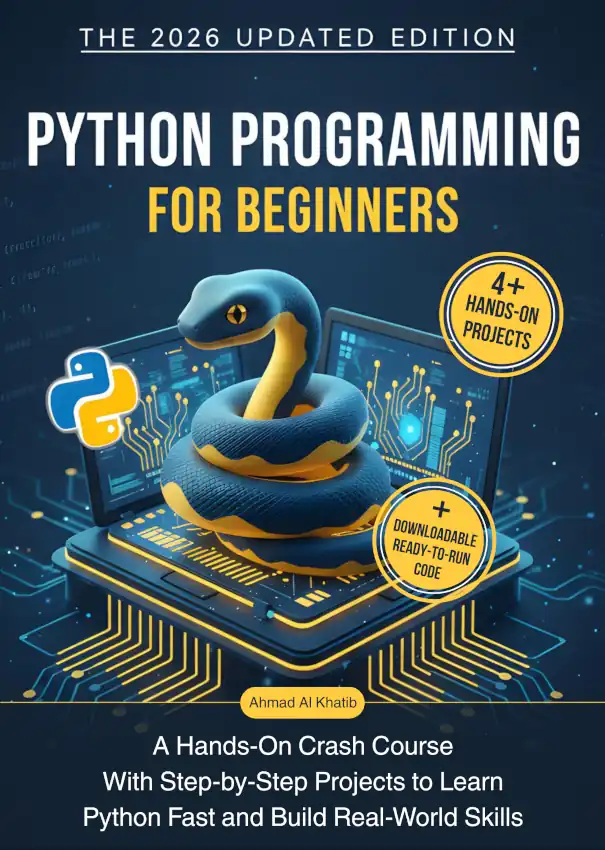
Book cover: Python Programming for Beginners, authored by Ahmad Al Khatib

A quick look at the table of contents

  1. Introduction
  2. Download and install the book’s prerequisites
  3. Chapter 1: An Exploratory Tour in Python
  4. Chapter 2: Numbers and Strings and Some Basic Operations
  5. Chapter 3: Lists and Loops
  6. Bonus: Downloadable resources
  7. Chapter 4: The if Conditional Statement
  8. Chapter 5: Dictionary, Tuple, and Set
  9. Chapter 6: The Conditional Loop, While Loop
  10. Chapter 7: Functions
  11. Chapter 8: The Class, OOP
  12. Chapter 9: File Management, Importing, and Some Basics

View the full table of contents

Table Of Contents

  1. How to Use This Book
  2. Who this book is for
  3. What you need before you start
  4. How the book is structured
  5. How to get the most value
  6. When something feels confusing
  7. Stay Connected
  8. Introduction
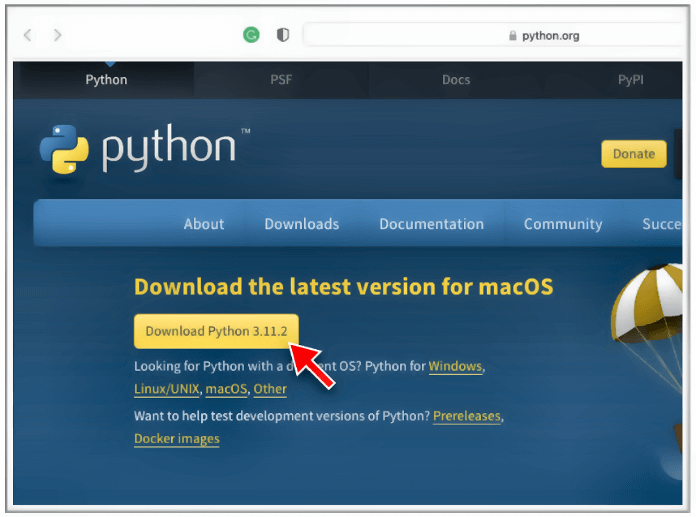
  9. Downloading and Installing the Book’s Requirements
    1. 1 – Downloading and Installing Python
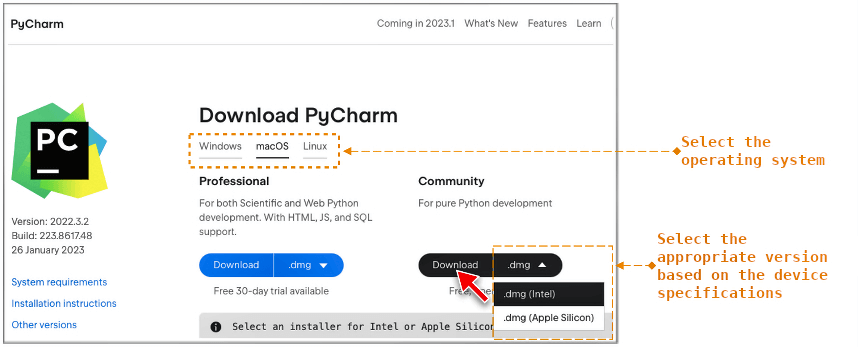
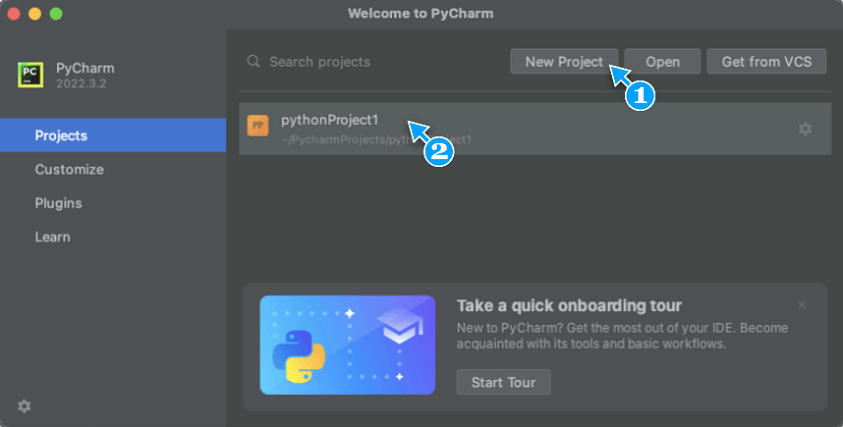
    2. 2 – Downloading and Installing PyCharm
      1. 2.1 – An Exploratory Tour of PyCharm
        1. 2.1.i – What is PyCharm?
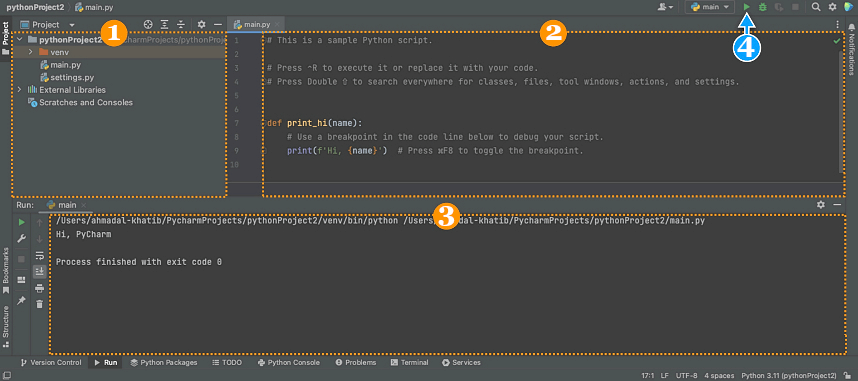
        2. 2.1.ii – The PyCharm Interface
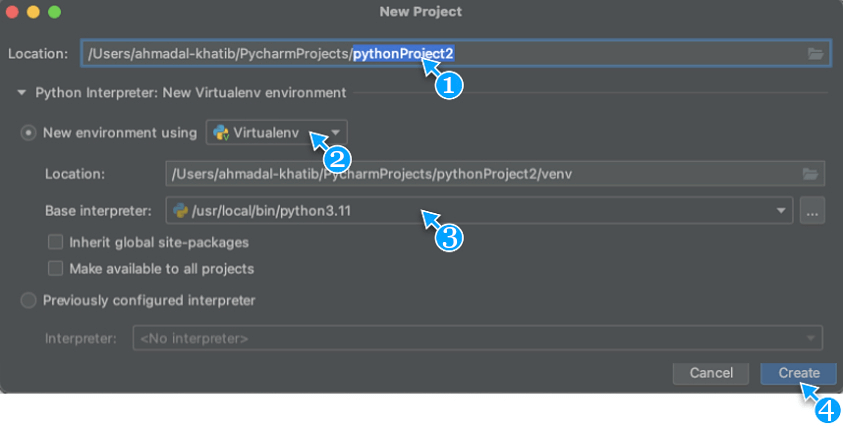
      2. What is the Virtual Environment?
      3. 2.2 – Downloading and Installing the Required Packages/Libraries for the Book’s Diagrams
  10. Chapter 1: An Exploratory Tour in Python
    1. 1 – The print() Function
    2. 2 – Variables and Values
    3. 3 – The Methods: .title(), .lower(), and .upper()
    4. Chapter One Exercise
  11. Chapter 2: Numbers and Strings and Some Basic Operations
    1. 1 – Numbers
    2. 2 – Use Cases of the Addition Operator (+) with Numbers VS. with Strings
    3. 3 – The int() and str() Functions
    4. 4 – Number Types in Python And Some Basic Arithmetic Operations
    5. 5 – Commands Related to Working with Strings
      1. 5.1 – Using Comma (,) Inside the print() Function to Combine Strings and Separate them with a Space
      2. 5.2 – The Tab Space (\t), and Moving to a New Line (\n)
      3. 5.3 – Defining Strings Using Triple Quotes (""" """)
      4. 5.4 – Removing Spaces from String Edges: .strip(), .rstrip(), .lstrip()
      5. 5.5 – Removing Text from String Boundaries: .removeprefix(), .removesuffix()
      6. 5.6 – Using the Backslash (\) to Escape Special Characters or Split Long Code Lines
    6. 6 – Adding Comments to Code (#)
    7. Chapter Two Exercise
    8. Solution
  12. Chapter 3: Lists and Loops
    1. Do you know about Minecraft?
    2. 1 – Introduction to Lists
      1. 1.1 – List Elements Ordering, and Element Code
      2. 1.2 – Manipulating Lists
        1. 1.2.i – Adding Elements to List
          1. 1.2.i.a – Appending a New Element at the End of the List Using the .append() Method
          2. 1.2.i.b – Adding a New Element at a Specific Order in a List Using the .insert() Method
        2. 1.2.ii – Removing Elements from a List
          1. 1.2.ii.a – Removing a Specific Element by its Value Using the .remove() Method
          2. 1.2.ii.b – Removing a Specific Element by Its Index Using the keyword del
          3. 1.2.ii.c – Removing a Specific Element from the List and Returning It Using the .pop() Method
      3. 1.3 – Modifying a Specific List Element by Its Index
      4. 1.4 – Rearranging List Elements
        1. 1.4.i – Rearranging List Elements in Ascending or Descending Order Using the .sort() Method
        2. 1.4.ii – Creating a Copy of a List Sorted in Ascending or Descending Order Using the sorted() Function
        3. 1.4.iii – Reversing the Order of List Elements Using the .reverse() Method
        4. 1.4.iv – Ordering Criteria
    3. 2 – The for Loop
    4. 3 – The range() and list() Functions
    5. 4 – List Dynamics in Python
    6. 5 – Statistical Functions: len(), min(), max(), and sum()
    7. Do you know about WhatsApp?
    8. 6 – Splitting a List into Parts (Slices)
      1. 6.1 – Slicing Syntax
      2. 6.2 – Copying Lists Using Slice Syntax, or the .copy() Method
    9. 7 – Defining Lists Using Comprehension Syntax
    10. Chapter Three Exercise
    11. Solution
  13. BONUS
    1. Installing and Running Jupyter
    2. Downloading and Opening the Interactive Book File in Jupyter
  14. Chapter 4: The if Conditional Statement
    1. Have you ever heard of the “clever fox” employee known as A.B.?
    2. 1 – The Keyword if, The Equality operator ==, and The Inequality operator !=
    3. 1.1 – Ignoring Letter Case in a Condition
    4. 2 – if in, and if not in
    5. 3 – (if >) Greater than, and (if <) Less than
    6. 4 – Writing Compound Conditions Using the Keywords (and) and (or)
    7. 5 – The if-elif-elif…-else Chain
      1. 5.1 – The if-else Chain
      2. 5.2 – The if-elif-else Chain
    8. Chapter Four Exercise
    9. Solution
  15. Chapter 5: Dictionary, Tuple, and Set
    1. Did you know that the fines imposed on Meta by the IDPC have reached into the billions of euros?
    2. 1 – Tuples
    3. 2 – Dictionaries
      1. 2.1 – Accessing a Dictionary Value
      2. 2.2 – Manipulating Dictionaries
        1. 2.2.i – Adding Pairs to a Dictionary Using Value-Syntax
        2. 2.2.ii – Deleting Key–Value Pairs from a Dictionary Using the del Keyword
        3. 2.2.iii – Modifying a Specific Dictionary Value Using Its Syntax
      3. 2.3 – The Methods .keys(), .values(), and .items()
      4. 2.4 – Executing the for Loop on Dictionary
        1. 2.4.i – Executing the for Loop Over the Dictionary’s Keys
        2. 2.4.ii – Executing the for Loop Over the Dictionary’s Values
        3. 2.4.iii – Executing The for Loop Over the Dictionary’s Pairs
    4. 3 – The Set
      1. 3.1 – The tuple() and set() Functions. The .add() and .update() Methods
    5. Chapter Five Exercise
    6. Solution
  16. Chapter 6: The Conditional Loop, While Loop
    1. 1 – The input() Function
    2. 1.1 – Handling Numeric Input from the input() Function
    3. 2 – The Conditional Loop: while
      1. 2.1 – Stopping a while Loop
        1. 2.1.i – Stopping a while Loop Using a Sentinel Value (!=)
        2. 2.1.ii – Stopping a while Loop Using a Flag
        3. 2.1.iii – Stopping a while loop with the break keyword
      2. 2.2 – Skipping a Specific Part of an Iteration Using the continue Keyword
      3. 2.3 – Practical Examples of Using the while Loop
        1. 2.3.i – Using the while Loop for Input Validation Until Correct Format
        2. 2.3.ii – Using the while Loop to Move Elements from One Data Container to Another
        3. 2.3.iii – Using the while Loop to Delete Specific Elements from a List
    4. 3 – Discussion: ‘Beyond the Syntax, the Power of Algorithmic Thinking’
    5. Chapter Six Exercise
    6. Solution
  17. Chapter 7: Functions
    1. 1 – Defining a Function
    2. 1.1 – Defining a Function That Accepts an Argument
    3. 1.2 – Defining a Function That Accepts More Than One Argument
    4. 1.3 – Setting a Default Value for a Parameter
    5. 1.4 – The return Keyword
    6. 1.5 – Embedding Loops Inside a Function
    7. 1.6 – Defining a Function That Accepts an Arbitrary Number of Arguments (*args)
    8. 1.7 – Defining a Function That Accepts an Arbitrary Number of Keyword Argument Pairs (**kwargs)
    9. 1.7.i – Passing a Dictionary to a **kwargs Function
    10. Chapter Seven Exercise
    11. Solution
  18. Chapter 8: The Class
    1. Introduction to Classes
    2. 1 – Defining a Class
      1. 1.1 – Attribute Access and Manipulation
        1. 1.1.i – Manipulating an Object Attribute Using Attribute Code
        2. 1.1.ii – Modifying an Attribute by Using a Method
      2. 1.2 – Assigning a Default Value to an Attribute
      3. 1.3 – Defining a Subclass Derived from a Superclass
      4. 1.4 – Chapter Conclusion, Object Oriented Programming Acquired
    3. Chapter Eight Exercise
    4. Solution
  19. Chapter 9: File Management, Importing, and Some Basics
    1. 1 – File Management in PyCharm IDE
    2. 2 – Importing
      1. 2.1 – Importing a Module
      2. 2.2 – Importing Elements from a Module
        1. 2.2.i – Importing Elements as Aliases
    3. 3 – File Handling in Python
      1. 3.1 – Accessing a File from a Module
        1. 3.1.i – Opening a File with open() and Reading with .read()
        2. 3.1.ii – Reading File Lines One by One with .readlines()
      2. 3.2 – Modifying a File Through the Module
        1. 3.2.i – Opening/Creating a File in Write Mode open("name", "w"), and Adding New Content .write()
        2. 3.2.ii – Opening a File in Append Mode open("name", "a") to Add New Content Without Deleting It
      3. 3.3 – Opening Files Stored Outside the Module’s Directory
    4. 4 – f-string, float(), .count(), .split(), .replace(), %, and The eval() Function
    5. Chapter Nine Exercise
    6. Solution
  20. Conclusion
  21. Resources & Links
  22. Errata & Updates
  23. About the Author
  24. Next Steps

Read the introduction

Introduction

Since the dawn of the twenty-first century, we have witnessed an immense digital surge, ushering in a new technological era that complements the digital revolution which began in the mid-twentieth century with the first appearance of the computer. This new era is characterized by advanced, intelligent electronic applications that invade our lives, expand into every aspect of them, and take root—parallel to a qualitative leap in the field of smart mobile devices, now accessible to everyone and spreading among the peoples of the earth like wildfire.

This new technological era—the era of smart devices and applications—has left a profound and far-reaching impact on our modern lifestyle, making it easier on multiple levels. For instance, who among us does not use the WhatsApp application and even rely on it for many daily tasks? Whether for chatting with family and friends or for work and communication with clients… The same question applies to many other applications that have permeated our lives and claimed a significant share of them—from Google and its ease of access to information, to Facebook and Twitter and the social media revolution, to ChatGPT and Gemini and the surge of artificial intelligence… and many more applications whose role and influence have grown so immense that they have become an urgent daily necessity and a way of life that is hard to abandon.

The deep impact this era has left on various aspects of our lives is a clear indication of the tremendous importance of the sciences that this great technology has brought us—namely, computing sciences. In this book, we will explore one essential and fascinating branch of these sciences: programming.

To further illustrate the significance of programming and its pivotal role in this age, let us consider this example and imagine what might happen if—for some reason—all software systems in a given country were to fail:

Such a grim scenario would likely lead to the following: government offices grinding to a halt, citizens unable to complete transactions, internet service collapsing, wireless communications failing, banks, factories, companies, airplanes, and high-speed trains ceasing to operate, and so on… In short, it would be a catastrophic scenario akin to life coming to a standstill.

In the digital age we live in, most operations depend fundamentally and critically on computing technology and programming. Consequently, programming has become a vital, indispensable necessity of our time.

This immense importance of programming has led to an enormous surge in demand for it, placing programming-related jobs at the forefront of the labor market. Learning this skill has become a golden opportunity to secure employment—not just any employment, but highly rewarding positions with generous pay, whether as permanent roles in companies or as freelance work that can be done from home.

So, if you are among those looking to seize this great opportunity to boost your income by learning an enjoyable and not overly demanding skill, and you are wondering where and how to begin, this book is your gateway to achieving that—through learning the wonderful programming language Python.

Who This Book Is For

This book is for anyone who wants to learn programming with Python from the ground up—students, self-learners, and professionals building new skills or preparing for a career change. No prior programming experience is required, and you don’t need advanced math—basic computer skills, curiosity, and a bit of practice are enough. If you’re completely new to coding (or you’ve tried before and felt stuck), this book is designed to guide you toward writing your own programs with confidence.

What is Python? And why did I choose it in this book as an entry point into the world of programming?

Python is a widely renowned programming language developed by the brilliant Dutch programmer Guido Van Rossum, who named it “Python” after the famous comedy series Monty Python’s Flying Circus. The first version of this language was released in 1991, and it has grown tremendously to become one of the most popular and widely used programming languages in the world.

Why Python?

With hundreds of programming languages available, the first question that may come to mind for someone deciding to learn programming is: “Which programming language should I choose?” My answer is: “Choose Python without hesitation,” for many reasons, including:

Ease of learning combined with powerful performance: Python is a smooth, easy-to-learn language, ideal for beginners, while also being extremely powerful and highly efficient for use in complex and advanced fields. For example, it is used in advanced research at NASA.

High demand and lucrative returns: Python is among the most sought-after and widely used programming languages. It is employed by major global companies such as Google, Facebook, Instagram, YouTube, Amazon, Uber… Moreover, it ranks among the highest-paying programming languages. For instance, according to Glassdoor, the average annual salary for a Python programmer in the United States ranges from $80,000 to $120,000.

Compatibility with different operating systems and versatility of use: Python is compatible with most well-known operating systems, such as iOS, Android, Linux, macOS, Windows, and others. This powerful language also boasts a wide range of applications—from automation to statistical and data sciences, to artificial intelligence, to web development, to game development, and more… along with many other reasons that make Python our language of choice.

I now place in your hands this comprehensive book covering most of Python’s fundamentals, written in a simple, fluid style that is easy for both young and old to understand. I have structured it in a semi-interactive manner, including code samples alongside their execution results, and enriched it with detailed, abundant explanations—similar to student notes—so that readers can learn independently without needing additional lessons or training courses. I have organized its topics in a flexible, systematic progression1, dividing it into two parts:

Part One: Fundamentals—distributed across nine essential chapters, accompanied by practice exercises.

Part Two: Practical Applications—consisting of five projects for hands-on experience in building programs and applications, which include, in sequence:
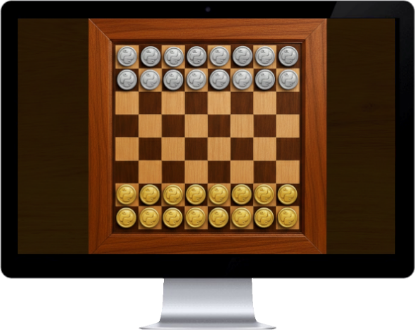
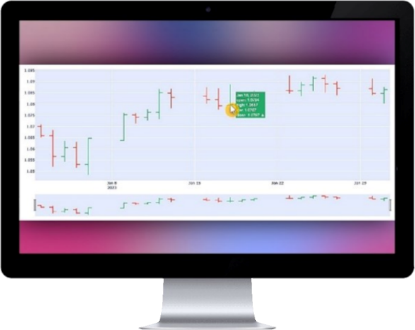
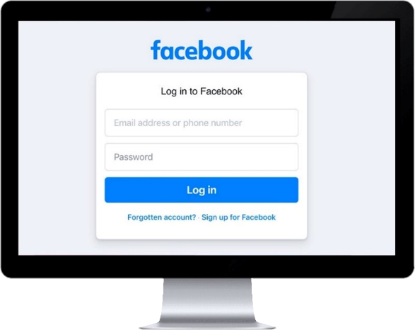
Figure 1: Creating a video game from scratch that includes numerous features.

Figure 2: Creating an interactive live chart program to analyze currency prices, receiving data via API.

Figure 3: Creating an automation program that opens a specific website and automatically performs predefined tasks.

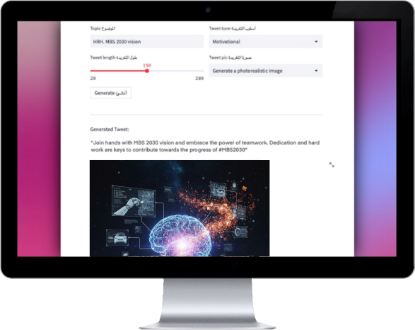
Figure 4: Creating a web application that generates text and draws images using artificial intelligence via API.

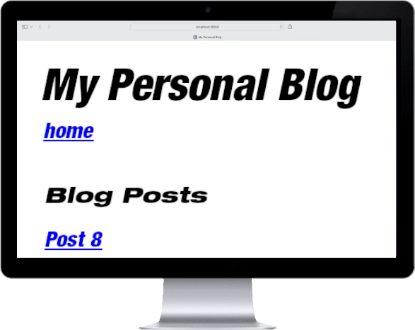
Figure 5: Creating a dynamic personal portfolio and blogging platform that manages data through a customized administrative backend.

And I have concluded this comprehensive book, which covers most of the fundamentals of Python, with a detailed index that can serve as a dictionary for this powerful, elegant, and easy-to-learn language.

And as it is customary to end introductions with dedications, I dedicate this work to my loving, close-knit family, under whose warmth I accomplished this endeavor; to my aunts Amal and Sahar, my uncle Dr. Anas Al-Khatib, who supervised the linguistic review of the Arabic version of this book, my uncle Brigadier General Dr. Hani Al-Khatib, my aunts, and my entire family, each and every one of them; and my friend Professor Khaled Hanqir, who encouraged me to complete this work.

I also dedicate this book to an exceptional figure, a leader among nations—one of those rare individuals who may only appear once in a century—who combines sound leadership, sharp vision, and creativity. His support for scientific research through his vision has placed it first regionally and among the top globally, and his influence motivated me to complete this book. I dedicate this work to His Royal Highness, Crown Prince of Saudi Arabia and Prime Minister, Prince Mohammed bin Salman bin Abdulaziz Al Saud.

And finally, I dedicate this book to one whose qualities I cannot fully describe, my refuge in hardship and ease, in sorrow and joy—my loving mother, Samar Al-Khatib.

Ahmed Al-Khatib

Read Chapter One

Exploratory Tour in Python

» Note 1: To learn from this book effectively and understand the exercises more easily, prepare PyCharm or a similar IDE so you can practice writing every code example presented and test running them yourself.

1 – The print() Function

In the introduction of this book, we mentioned Python’s distinctive simplicity. In Python, we can display—meaning print—any content on the screen, whether text, numbers, or symbol, simply by using one of the commands known as functions. The function we use for this purpose is print(), where we place the content we want to display inside its parentheses.

Here’s a simple example: If we enter the following code in the code editor of an IDE such as PyCharm or any similar program:

print("I wrote my first code!")

If we then run this code using the button we previously pointed out at the top of the PyCharm interface, this causes the content entered between the parentheses of the print() command to be displayed on the screen, and the result appears as follows:

I wrote my first code!

The meaning of this code is that we are instructing Python to display a specific piece of content on the screen using the print() command. The content we want to display is placed between the parentheses of this command, and we enclose it in double quotes " " to indicate to Python that it is textual content. In Python, text is identified by enclosing it in double quotes, and such text is referred to as a string.

» Note 2: We can also use single quotes ' ' instead of double quotes to define string content in Python. And this usage becomes mandatory in certain cases to avoid errors. Below are some examples:

⁕ Example 1: Using single quotation marks in the following code:

print('I started programming!')

serves the same role as double quotation marks. It tells Python that the content placed between these quotation marks is a string. In other words, it defines the text enclosed within them as textual content. Running this code displays the following output on the screen:

I started programming!

⁕ Example 2: However, if the text content you want to use already contains double quotes in its original form—such as the following sentence:

He says: "Hello mom!"

In this case, it becomes necessary to use single quotes instead of double quotes to define this string, in order to avoid errors, as shown in the example attached in the image below.

Figure 1.1: Using the single quotes to define a string, in order to avoid errors

⁕ Example 3: The same applies when the text content you want to use already contains a single quote (apostrophe) in its original wording. In this case, you do not use single quotes to define the string; instead, you use double quotes to avoid errors, as shown in the example attached in the image below.

Figure 1.2: Using double quotes to define a string, in order to avoid errors

2 – Variables and Values

Storing information in programs for various purposes is one of the most fundamental principles of programming. In Python, we can store specific pieces of information under designated names, so that we can access any of these pieces of information later by referring to the name in which it was stored.

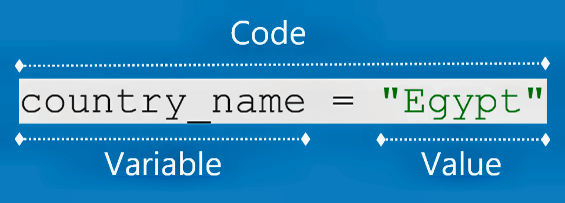
The stored piece of information is technically called a value, and the name under which this information is stored is called a variable. Here’s an example:

country_name = "Egypt"

In the line of code above, we stored the value "Egypt" in the variable country_name. If we then print this variable using the print() function, as shown in the following line of code:

print(country_name)

This outputs the value stored in the variable country_name, not the variable name itself. The result of running this code is:

Egypt

» Note 3: If we print the name "country_name" enclosed in quotation marks, as shown in the following line of code, Python interprets it as a string not as a variable. Running this code therefore prints the name itself:

print('country_name')

→ country_name

Figure 1.3: Variables and Values

» Note 4: If a variable name consists of two or more words, do not separate them with spaces (for example, country name). Instead, use underscore (country_name) to avoid errors:

country name = "KSA" → error

In addition to the previously mentioned rules for naming variables, numbers can also be used in a variable name (for example, country1_name_1). However, never start a python variable name with a number, as this causes error:

1country_name = "KSA" → error

» Note 5: If the same variable name is repeatedly used across multiple lines of code to store different pieces of information, then printing the content of this variable in such a case displays the content of the most recent variable assigned that name. Below is an example:

1. given_name = 'George Washington'

2. given_name = 'Martin Luther King Jr.'

3. print(given_name)

In line 1 of the (code) example above: We stored the value "George Washington'' in the variable given_name. Then in line 2: We stored the value 'Martin Luther King Jr.' in another variable that also carries the name given_name. Accordingly, printing the content of the variable given_name using the function print() in line 3 results in printing the content of the most recent variable assigned this name before the print command. Therefore the output of running this code is:

Martin Luther King Jr.

►► Quick Review: Up to this point, we have learned how to define strings in Python by enclosing them in double quotes or single quotes. We have also learned how to display text on the screen using the print() function, and how to store a piece of information (a value) in a name (a variable).

3 – The Methods: .title(), .lower(), and .upper()

In Python, there is another set of commands known as Methods. For now, you do not need to focus on these names—such as method and function—since we will cover them later in detail (and from this point onward, we will indicate the results of running the code by highlighting them in blue).

1. drink = "water"

2. print(drink)

water

3. print(drink.upper())

WATER

In line 1 of the example code above, we stored the value 'water' in the variable drink. Then, in line 2, we printed the content of this variable using the print() function. After running this code, as shown in the output above—and as expected—it printed the value stored in this variable in its original form.

As for line 3, printing the contents of the variable drink using the print() function, combined with adding the .upper() method—which converts the characters of a string to uppercase—resulted in printing the contents of this variable in uppercase letters: WATER. These commands, whose meanings are clear, are among the features of Python, which makes it easier for programmers to remember the functions of Python commands based on their meanings, as print() and .upper().

We can also convert the letters of strings to lowercase by using the .lower() method. And it isn’t required to use these commands inside the parentheses of the print() function as we did in the previous example; they can be used in different contexts, as we will do in the next example:

1. name_1 = "EMMA"

2. name_2 = name_1.lower()

3. print(name_2)

emma

In line 1 of the example code above, we stored the value 'EMMA'—written in uppercase letters—in the variable name_1. Then, in line 2, we used the .lower() method to convert the characters of the string stored in name_1 into lowercase letters, and we stored the result in the variable name_2. Finally, in line 3, we printed the contents of name_2 using the print() function. As we can see from the output of running this code, applying the .lower() method converted the string 'EMMA' into lowercase letters: emma.

Another common style used for writing proper names, book titles, and similar items consists of capitalizing the first letter of each word while writing the remaining letters in lowercase. For example: Donald Trump. In Python, we can convert text into this format by using the .title() method. Here’s an example:

1. presidential_candidates = "donald trump, joe biden, kamala harris"

2. print(presidential_candidates.title())

Donald Trump, Joe Biden, Kamala Harris

We can see from the result of running the code above that using the .title() method in line 2 has converted the text stored in the variable presidential_candidates into the required formal format.

►► Reminder: If you encounter any difficulties as beginners starting out with this book, I encourage you to reach out to me on social media to share your questions, or contact me through my website:


@alkhatib_ahmad1

https://ahmad-khatib.com/en/

Chapter One Exercise

The exercise for this introductory chapter is very simple. Try to unleash your imagination and write a piece of code that is at least ten lines long. You might design it so that, when executed, it prints your name and the names of your family members or friends in different letter cases. Make sure to use the following commands and symbols in your code:

= " " ' ' print() .lower() .upper() .title()

Why This Book

Here’s the difference: you don’t just read about Python. You learn each concept, see it working, and then practice it through guided mini-programs and exercises with solutions—so the understanding truly sticks when you code on your own.

  • Beginner-friendly and easy to follow: Clear explanations using a Code + Result approach, written specifically for absolute beginners—no confusing jargon.
  • No prior programming or math background required: Start from zero with step-by-step guidance throughout the book.
  • Learn clean, professional Python the right way: Build strong coding habits from day one using industry-proven best practices.
  • Real-world examples you can actually use: Practical examples and exercises—not abstract theory.
  • Learning that stays enjoyable: Explanations, examples, and exercises designed to keep you engaged through hands-on practice.
  • More than a book—it’s a career foundation: Develop skills you can grow into real projects, jobs, and long-term opportunities.

What you can do with confidence after finishing this book

  • Set up Python properly and understand PyCharm IDE workflow, virtual environments, and why they matter (so projects stay clean and organized).
  • Write clean Python using variables, numbers, and strings—including essential text methods and formatting (f-strings, split, replace, and more).
  • Use lists effectively: add/remove/sort, slicing, copying, list comprehension.
  • Control program logic with if/elif/else, comparisons, and logical conditions.
  • Organize real data using dictionaries, tuples, and sets.
  • Build interactive programs with input() and while loops (including validation, flags, break/continue).
  • Create reusable code with functions (default values, return values, *args, **kwargs).
  • Understand classes and core object-oriented programming (OOP) concepts.
  • Read and write files, import modules, and organize larger projects efficiently.
Author photo: Ahmad Al Khatib

About the author

Ahmad Al Khatib is a Lebanese technologist and programmer passionate about artificial intelligence, dedicating his expertise to making modern technology accessible to everyone—especially beginners. He holds specialized certifications in multiple tech fields and authors books that simplify programming and digital development concepts in a clear, engaging style. In his latest work, “Learn Python in Less Than a Week,” Ahmad lays out a practical, methodical roadmap for mastering Python efficiently. Outside writing and coding, he follows Middle East startup trends, blogs about tech and politics, and stays active in his online community. For exclusive lessons, updates on new releases, and deep insights into the world of technology, you’re invited to join his growing network.

Ready to enhance your skills and advance your career with Python?

This book guides you step by step to learn the most in-demand programming language efficiently, with clear explanations, practical examples, and hands-on exercises. Build real projects, strengthen your coding foundation, and open doors to new opportunities in tech.

Get your copy now